SIGN UP FOR OUR
 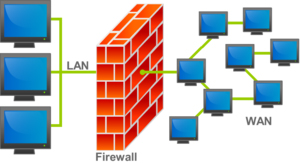 A firewall is normally a software application (there are a few hardware firewalls) that protects an internal network, or a device, from unwanted intrusion (inbound firewall), and guards the traffic going to the network (outbound firewall). An inbound firewall is like a security guard, who checks your identity and belongings before you enter a building. Their job is to prevent unauthorized access to the building. The security guard can also check what you are taking from the building to insure you are authorized to remove any articles from the building. Just as security guards follow a set of rules, so do firewalls.
There may be multiple firewalls between you and the Internet. I have worked in secure facilities where my badge granted me access to the building. The same badge determined which floors I could access, and then what rooms I could access on that floor. The inbound firewall on the router determines what traffic can enter the local network. The inbound firewall on the device determines the traffic allowed to pass to the device. For example, you have an computer on your local network that is a Web server for the external world. The router traps all incoming HTTP requests and directs them to the correct internal server, without telling the outside world the actual identity of the server. The external Web server accepts traffic from the external world, and the local network traffic. There may be other computers on the local network that host a Web server, but they block all traffic not coming from the internal network. Another example, the router blocks all requests for printer services, but the firewalls on the local network computers, with shared printers, only accept requests from the local network.
The outbound firewall determines what services on your computer are allowed to pass to the network. The outbound firewall often allows you to determine which applications are allowed to access the network. For example, you may allow a VPN service to access the network from your computer. At the same time, the router has to allow you to make VPN connections to an external VPN server. What happens if you accidentally downloaded a malicious application that wants to infect other computers on your network, or turn your computer into a spam server. The outbound firewall can block these applications from accessing the network.
The early firewalls only offered inbound protection. Outbound firewalls came later, as a way to protect the network from internal threats. Thus, Windows XP only offers an inbound firewall. Windows Vista and Windows 7 have both inbound and outbound firewalls. Linux has offered both firewalls for many years before Windows adopted an outbound firewall. Smartphones and tablets are a problem, as many do not have any firewall. Since I don’t own an iPhone, iPad, or iPod Touch, I can’t speak about these devices. However, recent Internet news about unauthorized modifications to SIM cards suggest that they do not. Plus, a Google search for iPhone and iPad firewall apps returned a lot of references, but no apps.
Android phones and tablets are harder to qualify, as to whether or not they are running a firewall. As a derivative of Linux, the Android kernel (the program that manages the device) does support IPtables. IPtables define the rules used by the kernel to filter network traffic. Android phone and tablet specifications do not mention firewall support, and there is no way to check what the manufacturer implemented without modifying an Android device to have root access. I checked a number of Android devices, and they all have empty IPtables, which means no firewall protection.
There are a number of Android apps that do implement firewall protection. I recommend the DroidWall as the most flexible firewall. In addition to providing a firewall, avast! Mobile Security provides anti-virus, and anti-theft protection. These do require root access to the device, as does every Android app that provides a firewall. I do wish phone manufactures would provide a firewall app with every mobile device. For non-rooted phone, the only solution is to use a VPN (Virtual Private Network), as the VPN server firewalls provide protection.
So what difference does it make if my computer, or mobile device, does not have a firewall? Doesn’t my ISP have a firewall to protect its network? Isn’t the firewall on my router sufficient? Your ISP blocks some malicious traffic, but it cannot block legitimate Internet services, as your ISP has no idea what services you offer to the Internet. Consequently, you need a firewall on your device, when you are directly connected to the Internet via a cable modem, USB data card, or 3G data service to block probes for services. If you are connecting to the Internet via Wi-Fi, you need a firewall. As pointed out in the previous article, Wi-Fi networks are subject to unauthorized intrusion. This especially true, when your use a public Wi-Fi network.